TubeBoard: Live Departures

Your station.
Your platform.
Your next train.

Live London departures, grouped the way you read them at the station. Open the board, see every second count down, and get moving.

Available for iPhone and iPad, with Premium on Apple Watch and a native Apple Vision Pro experience.

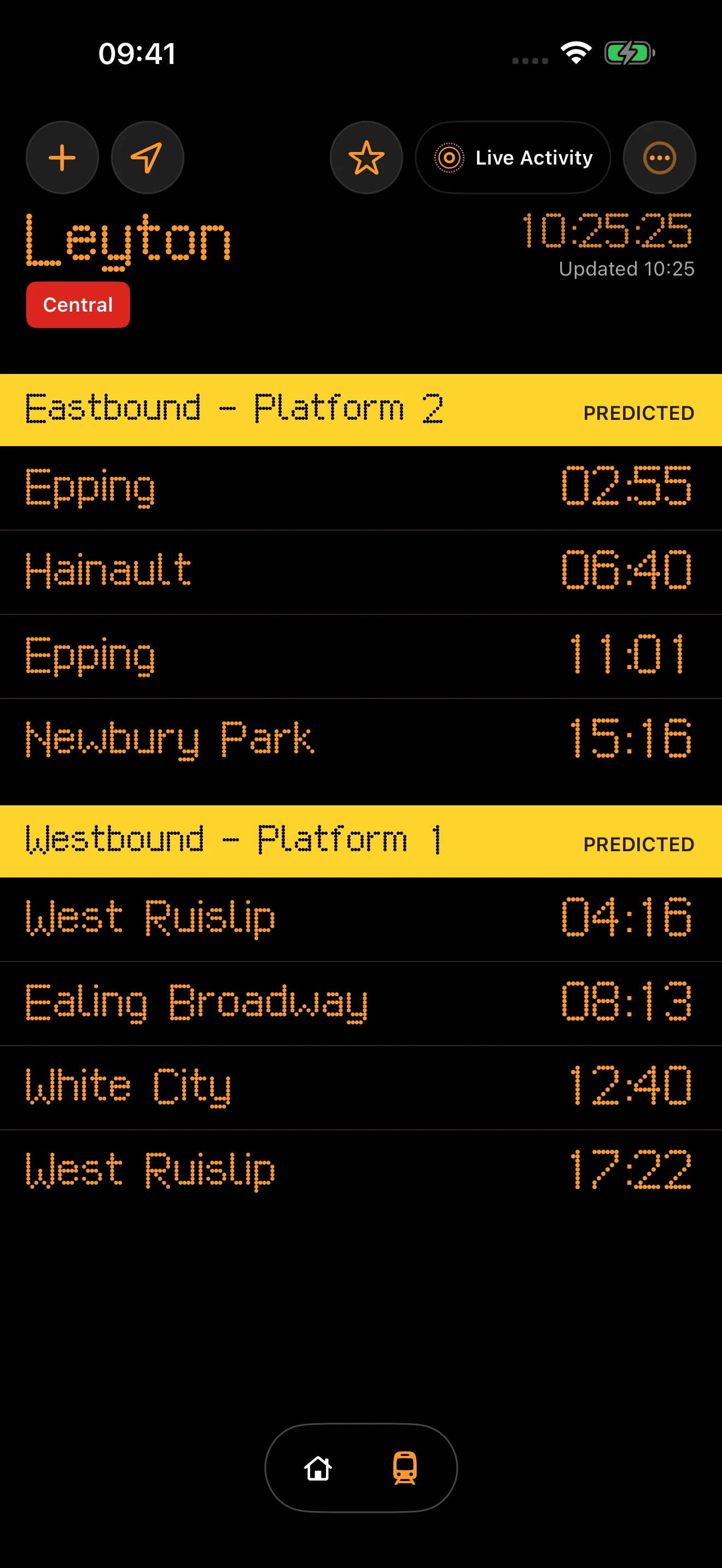
TubeBoard showing Central line departures at Leyton, grouped by eastbound and westbound platforms

LeytonLive board · Simple mode

No account

No adverts

No tracking

Powered by TfL Open Data

The live board

The information you look up for, without the route-planner clutter.

Choose a service and station. TubeBoard arranges the next trains by platform and direction, with destinations and countdowns kept in a single, readable view.

Every second
Countdowns tick locally between refreshes, with clear Due and Here states.
Every platform
Arrivals stay grouped by platform or direction using the data TfL provides.
Your level of detail
Simple mode stays glanceable. Detailed mode adds train IDs and current locations when available.
TubeBoard asking which line to open at Stratford, with Central, Elizabeth and Jubilee choices

Find your stop

Pick a line. Search a station. Open the board.

TubeBoard starts with the station you care about. Search the network, choose the right service at an interchange, use Nearby Station when you are already there, or return to one of your recent stops.

  • Searchable line and station lists
  • Clear service choices at interchange stations
  • Nearby matching stays on your device
  • Your three most recent stations stay close

Read it your way

A quick glance, or the detail behind it.

Simple mode keeps the board pared back to destinations and times. Detailed mode adds the line, train identifier and live location where TfL supplies them. Both modes are included for free.

Boards refresh automatically about once a minute. Pull down whenever you want to request the latest predictions.

TubeBoard Detailed mode showing train identifiers and reported locations for Central line departures

Home at a glance

The network status and your next board, together.

Home keeps the compact Tube status rail, recent stations and the fastest ways into a live board in one place. Nearby matching remains private and runs on your device.

Status
One compact severity rail
Recents
Your three latest stations
Private
Nearby matching stays on device
TubeBoard Home showing the Tube status rail, recent stations and quick actions

New in version 1.1

Your board, in more of the places you need it.

Configure a widget for a real platform, choose the right line at an interchange, and opt in to only the disruption alerts that matter to you.

Station and platform widgets

Premium widgets use one of your saved stations and one of its available platforms, with cached and offline states kept explicit.

The iPhone widget gallery previewing a Favourite Tube Board widget for Leyton eastbound platform 2

Alerts for the lines you choose

Premium disruption alerts are opt in, with selected-line, severity, resumed-service and quiet-hour controls.

TubeBoard disruption alert settings with the Central line selected

Beyond the app

The next train stays where you can see it.

Lock Screen

Start a Live Activity and keep the active board visible while you move through the station.

Dynamic Island

See the next countdown in the compact view and open the expanded board on supported iPhones.

StandBy

Use the same Live Activity when iPhone is charging on its side.

Widgets

Configure each Premium Home Screen or Lock Screen widget for a saved station and one of its real platforms. It shows scheduled snapshots and makes cached or offline data clear.

Apple Watch

Premium brings synced favourites, on-device Nearby matching and grouped departures to the companion Watch app.

Apple Vision Pro

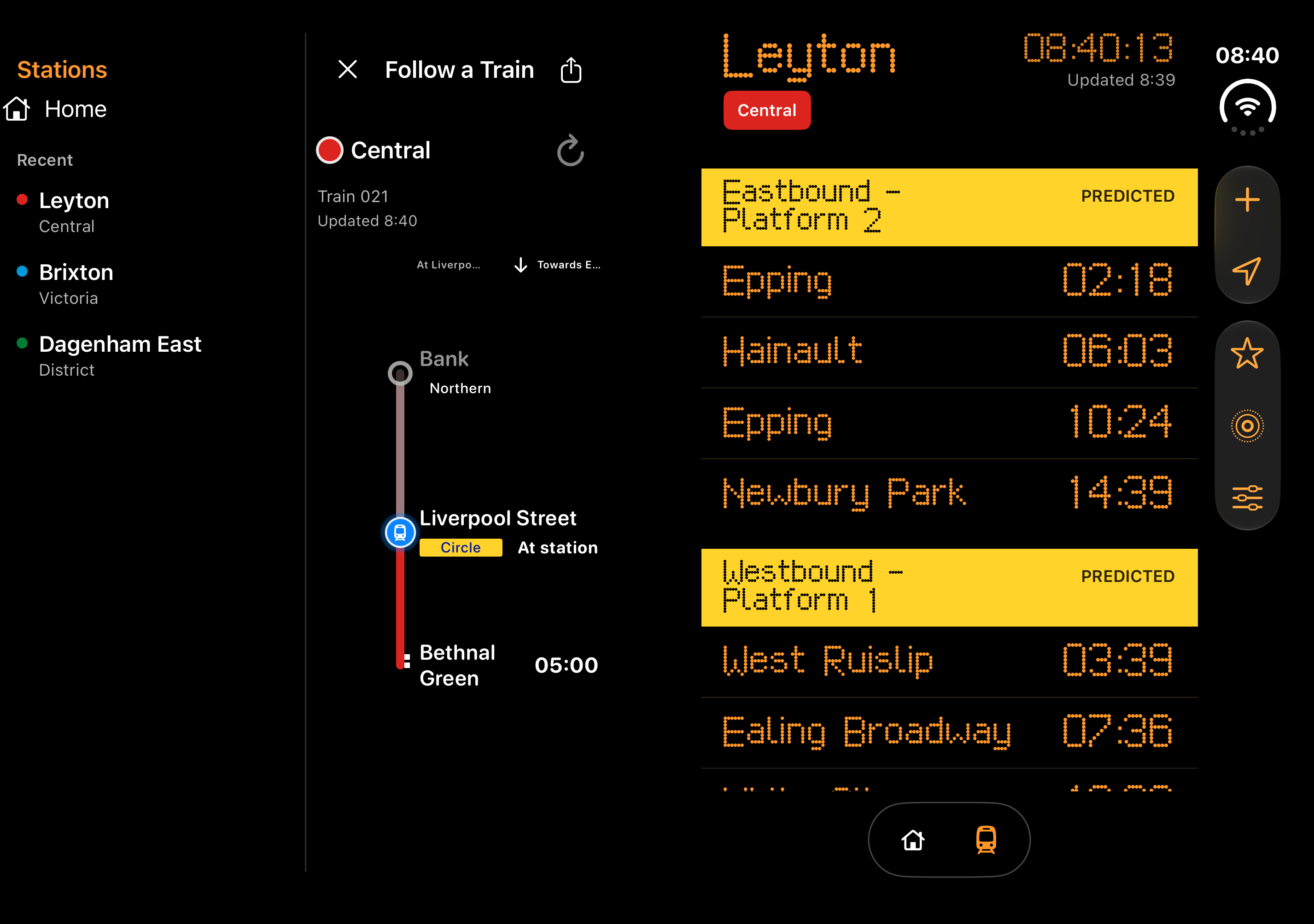
Place native board and map windows in your space, or keep departures visible in a spatial widget.

Every user gets three complimentary Live Activity sessions. Premium makes Live Activities unlimited and unlocks widgets.

TubeBoard Premium

More of the board, wherever you need it.

Premium adds the commute tools with an ongoing service cost, while keeping the essential live board genuinely useful for free.

Unlimited favourite stations

Unlimited Live Activities, Dynamic Island and StandBy

Saved-station and platform widgets

Time to Leave for every favourite

Foreground Apple Maps catchability guidance

Platform headers coloured by Tube line

Opt-in disruption alerts for selected Tube lines

Apple Watch companion app

Family Sharing on yearly and lifetime plans

  1. Monthly Premium

    Flexible, month by month

    £1.99per month

  2. Yearly Premium

    Includes a 7-day free trial · Family Sharing

    £9.99per year

  3. Lifetime Premium

    One purchase · Family Sharing

    £24.99one-off

UK launch pricing. Purchases and subscriptions are handled securely by Apple in the app. Subscriptions renew until cancelled.

What is included
FeatureFreePremium
Live departures and station searchIncludedIncluded
Automatic refresh and both board modesIncludedIncluded
Favourite stationsOneUnlimited
Live ActivitiesThree sessionsUnlimited
WidgetsIncluded
Time to LeaveIncluded
Apple Maps catchability guidanceIncluded
Selected-line disruption alertsIncluded
Apple Watch appIncluded
Line-colour platform headersIncluded

Independent and private

Useful information, with very little asked of you.

TubeBoard needs no account and contains no advertising, analytics or cross-app tracking. Favourite stations, recent stations, display choices and Nearby Station matching stay on your device.

Live Activities use a short-lived registration so the TubeBoard service can send the selected board through Apple Push Notification service. Inactive registrations are removed automatically.

Questions

A few useful answers.

Is TubeBoard an official TfL app?

No. TubeBoard is independent and is not affiliated with, endorsed by or sponsored by Transport for London.

Does TubeBoard use live data?

Yes. It uses TfL Open Data for live arrival predictions and line status information where available. Predictions can change during disruption or when source data is delayed.

What can I use for free?

The live board, station search, automatic refresh, Simple and Detailed modes, five successful Nearby Station activations, Recents, one favourite and three Live Activity sessions are free.

What does Premium add?

Premium unlocks unlimited favourites, Nearby and Live Activities; saved-station and platform widgets; Time to Leave and catchability guidance; selected-line disruption alerts; the Apple Watch app; and platform headers coloured by Tube line.

Does it plan journeys?

No. TubeBoard is designed for the moment when you already know your station and want the next departures quickly.

Where can I download it?

Download TubeBoard from the App Store on an iPhone or iPad running iOS 18.6 or iPadOS 18.6 or later. Premium also includes the companion app for Apple Watch; the native Apple Vision Pro app requires visionOS 26.0 or later.

Live departures, ready when you are.

TubeBoard is available now on the App Store for iPhone and iPad.

Download on the App Store